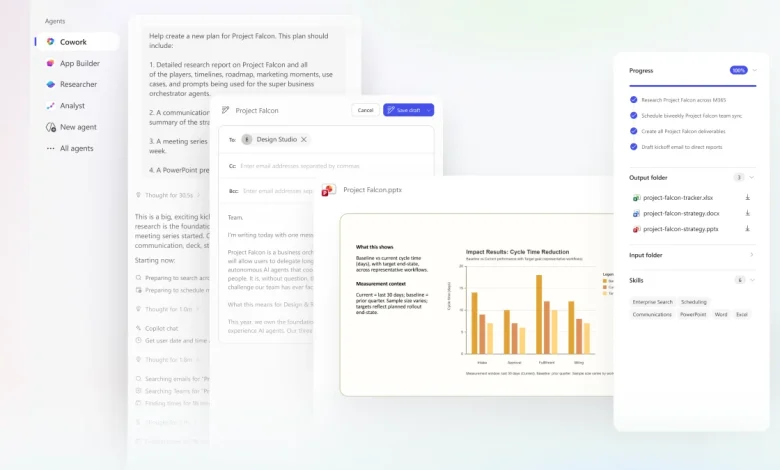
outlook 365 faces an inflection as Copilot Cowork moves generative AI from providing answers to executing work across email, calendar, files and data.
What Is the Inflection Point?
Copilot Cowork reframes the role of workplace AI by taking tasks beyond chat and into sustained, background execution. Microsoft positions Cowork as a capability that “takes action, not just chat”: it delegates work, grounds requests in email, meetings, messages, files and data, and produces multi-step plans that continue in the background. The feature is powered by Work IQ and leverages signals across Outlook, Teams, Excel and the broader productivity suite to act with workplace context while leaving final approvals in human hands.
What Happens When Copilot Cowork Meets Outlook 365?
The core trade the product makes is autonomy with checkpoints. Cowork turns a natural-language ask into a plan, monitors progress, checks for clarification when needed, and surfaces recommended actions for user approval. Practical examples cited include calendar triage that accepts, declines or reschedules meetings and inserts focus time; end-to-end prep for customer meetings that gathers emails and files, schedules prep time, and produces a briefing, slide deck and draft status email; and deeper research that assembles earnings reports, SEC filings, analyst commentary and related primary financial data.
These mechanics matter for outlook 365 specifically because email and calendar are primary coordination layers in most organizations. By embedding execution flows that read and act on calendar and message signals, Cowork can reduce manual coordination work while keeping users in control through explicit checkpoints and approvals.
What Comes Next?
The current releases and surrounding headlines—announcing model broadening and a new AI-focused bundle—set a clear set of short-term contingencies. Below are three plausible near-term scenarios and a compact view of winners and losers under each.
- Best case — Cowork reliably automates routine coordination and preparatory work while preserving human approval. Productivity rises as teams reclaim focus time and handoffs become smoother.
- Most likely — Cowork reduces time spent on repeatable tasks but requires configuration, oversight and policy guardrails. Adoption concentrates in teams that maintain structured workflows and clear data governance.
- Most challenging — Execution features surface errors or misaligned actions that require frequent human correction, slowing adoption and raising governance and compliance concerns.
Who wins and who loses will track organizational readiness and governance: teams with defined processes, centralized data practices and explicit approval flows are positioned to capture efficiency gains; knowledge workers in poorly instrumented environments may see added friction or oversight burdens. Platform owners who embed Cowork flows into shared templates and playbooks gain leverage; ad hoc users without role-based guardrails risk inconsistent outcomes.
Forward planning should focus on three modest, practical moves: inventory routine email and calendar tasks that are repeatable; define explicit checkpoints where human approval must remain; and apply governance to data sources Cowork can access. These steps limit downside while allowing teams to pilot the new execution model at scale. Given Cowork’s grounding in Outlook, Teams, Excel and Work IQ signals and the broader push to expand Copilot capabilities, organizations should treat the moment as operational redesign rather than a feature toggle. Expect iterative rollout, close monitoring of approvals and workflow templates, and gradual expansion of tasks handed off to AI as trust builds.
In short: this is the start of execution-first workplace AI, and planning now will determine whether outlook 365 becomes a productivity multiplier or a governance headache.