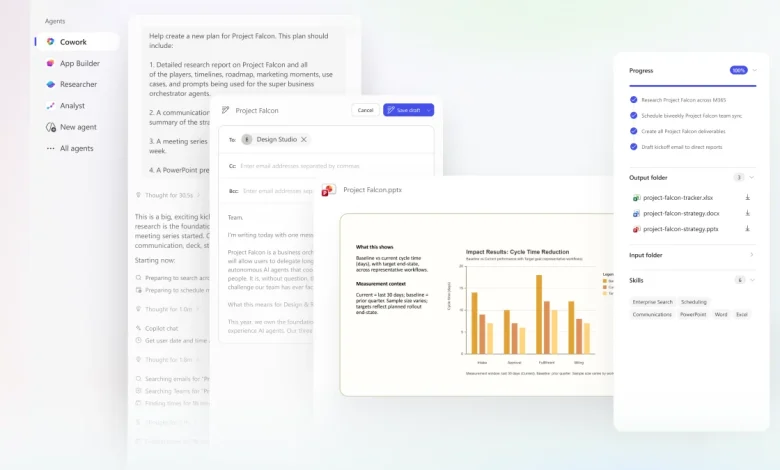
microsoft 365 is entering an inflection point with Copilot Cowork, a capability that shifts Copilot from a question-and-answer assistant to an agent that turns intent into coordinated action across a user’s work—while keeping humans in control.
What Happens When Microsoft 365 Copilot Cowork Takes Action?
Copilot Cowork is built to have Copilot take action, not just chat. Powered by Work IQ, Cowork grounds requested outcomes in the signals that live across Outlook, Teams, Excel, and other Microsoft 365 apps. When a user hands off a task, Cowork translates the ask into a plan that proceeds in the background with transparent checkpoints. It checks in when clarification is needed, shows recommended actions for approval, and executes changes only after the user confirms—preserving oversight while removing routine friction.
What If Cowork Manages Your Week, Meetings and Research?
Three concrete workflows from the Cowork design illustrate how execution unfolds in practice:
- Calendar triage: Cowork reviews Outlook schedules, highlights conflicts and low-value meetings, proposes rescheduling or declines, inserts focus time, and can draft prep documents.
- Meeting preparation: Cowork aggregates relevant emails, meetings, and files, schedules prep time, and produces a connected set of deliverables—a briefing document, supporting analysis, and a client-ready deck—then saves everything in Microsoft 365 for team refinement.
- Deep research: Cowork gathers earnings reports, SEC filings, analyst commentary, and relevant news with an emphasis on primary financial data, then organizes findings to support decisions.
Across each scenario, the plan-to-action loop is emphasized: Cowork coordinates the work around content, keeps users informed with checkpoints, and advances multiple tasks concurrently so people can focus on higher-value work.
What Should Users and Teams Prepare For Next?
The immediate implication is operational: users should expect an assistant that goes beyond drafting and summarizing to one that proposes, coordinates, and applies changes inside their productivity stack. The control mechanisms described—visible recommendations, checkpoints, and the ability to approve or pause execution—are central to adoption. At the same time, the examples signal where attention should focus: consent and oversight on automated changes to calendars and documents; verification practices for assembled research; and team alignment on outputs saved inside the shared work environment.
Uncertainty remains around how teams will shape policies for delegation and what guardrails they will require, but the core shift is clear: the difference between getting an answer and getting something done is now embedded in how Cowork ties intent to action across Outlook, Teams, Excel, and the broader microsoft 365 ecosystem.
The era of Copilot execution is here; readers should anticipate a workflow where delegation is routine, verification checkpoints are the primary safety valve, and the productivity conversation moves from generation to governance in microsoft 365